In recent years, NFC technology has quietly moved from niche applications into mainstream business environments. One of the most practical and rapidly growing use cases is the website NFC tag—a simple but powerful tool that connects physical objects directly to online experiences.
But beyond the basic definition, businesses are now asking deeper questions:
- Does NFC actually perform better than QR codes?
- What kind of NFC tag should be used for websites?
- Where does it truly create measurable business impact?
This guide goes beyond definitions and explores how website NFC tags work in real-world deployments, where they deliver ROI, and how to implement them correctly.
What Is a Website NFC Tag
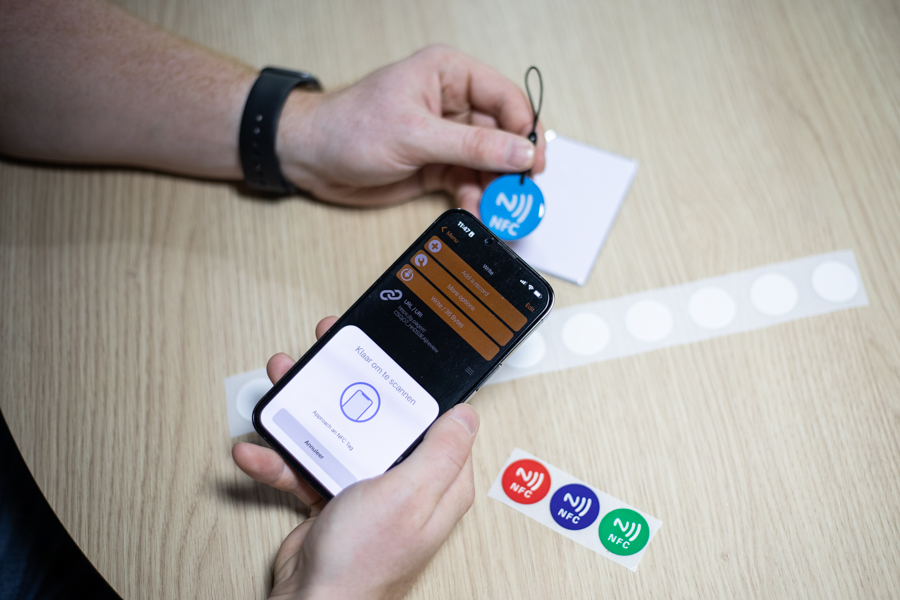
A website NFC tag is a passive NFC chip encoded with a URL. When a user taps the tag with an NFC-enabled smartphone, the device automatically opens the associated website in the browser—no app, scanning, or manual input required.
Unlike active devices, NFC tags:
- Require no battery
- Do not generate signals on their own
- Are activated only when scanned at close range (typically within 2–4 cm)
This creates an almost invisible interaction layer between the physical and digital world.
How Website NFC Tags Work (Technical Breakdown)
At a technical level, website NFC tags rely on a standardized data format called NDEF (NFC Data Exchange Format).
The process works as follows:
- A URL is encoded into the NFC chip memory
- The tag stores this data in NDEF format
- A smartphone detects the NFC field
- The OS interprets the record as a URL
- The browser launches automatically
Modern devices—including Android phones and iPhones (iPhone 7 and later)—support this behavior natively.
Key Technical Constraints
Understanding limitations is critical for proper deployment:
- Memory size matters: Longer URLs require higher-capacity chips
- Encoding efficiency affects compatibility
- Read sensitivity depends on antenna design and materials
What Type of NFC Tags Are Used for Websites?
Not all NFC tags are equal. Choosing the wrong chip can lead to failed scans or limited functionality.
Common NFC Chips for Website Tags
- Memory: 144 bytes usable
- Suitable for short URLs
- Most cost-effective option
NTAG215
- Memory: 504 bytes usable
- Supports longer URLs or tracking parameters
- Balanced cost-performance choice
NTAG216
- Memory: 888 bytes usable
- Ideal for dynamic links or complex use cases
- Higher cost but more flexibility
Practical Insight
In large-scale deployments (such as retail or events), most businesses choose:
- NTAG213 for static marketing links
- NTAG215/216 for dynamic or trackable URLs
From a manufacturing perspective, antenna quality and material encapsulation often matter more than the chip itself in real-world performance.
NFC vs QR Code: Which Performs Better?
This is one of the most common questions—and one of the most misunderstood.
Both technologies connect offline to online, but their user experience differs significantly.
Interaction Friction
- NFC: Tap → instant action
- QR code: Open camera → align → scan → confirm
Even small friction differences impact user behavior at scale.
Environmental Performance
NFC works better when:
- Lighting is poor
- Surfaces are damaged or curved
- Speed matters (e.g., events, transit)
QR codes perform better when:
- Users are not familiar with NFC
- Long-range interaction is needed
- Visual prompts are required
Conversion Insight
In controlled environments (events, retail displays), NFC interactions often achieve higher engagement rates due to lower friction.
However, the best-performing deployments frequently combine both:
NFC for speed, QR for visibility.
Real-World Use Cases Where Website NFC Tags Deliver ROI
Not every scenario benefits equally from NFC. The highest impact comes from environments where speed, repetition, and user intent align.
1. Product Packaging (Authentication & Engagement)
Brands embed NFC tags into packaging to:
- Link to product verification pages
- Provide user manuals or tutorials
- Deliver post-purchase engagement
This is especially valuable for:
- Premium goods
- Electronics
- Regulated products
2. Retail Displays (Interactive Shopping)
In-store NFC tags allow customers to:
- View product specifications
- Check availability
- Access reviews
This reduces reliance on staff and enhances self-service experiences.
3. Events and Exhibitions (Lead Capture)
NFC-enabled wristbands, badges, or posters enable:
- Instant access to event pages
- Contactless lead capture
- Session check-ins
Industry Insight
In large-scale events, NFC significantly reduces congestion compared to QR scanning.
4. Smart Posters and Outdoor Advertising
Unlike QR codes, NFC tags:
- Do not rely on visibility
- Work even when partially damaged
- Provide faster interaction
This makes them ideal for:
- Transit ads
- Public signage
- High-traffic environments
5. Digital Business Cards
NFC business cards allow professionals to:
- Instantly share contact pages
- Link to portfolios or LinkedIn
- Update content dynamically without reprinting
6. Hospitality and Service Environments
Hotels and restaurants use NFC for:
- Menus
- Check-in portals
- Service requests
This reduces friction while maintaining a premium experience.
Case Study Insight (From Manufacturing Perspective)
From real deployment experience in large-scale NFC projects, several patterns consistently emerge:
1. NFC Works Best in “Intent-Rich” Moments
Users are more likely to tap when:
- They are already engaged (shopping, attending an event)
- The action is clearly beneficial
2. Placement Matters More Than Technology
A well-placed NFC tag can outperform a technically superior one in a poor location.
3. Durability Is Often Overlooked
Outdoor or industrial deployments require:
- Waterproof encapsulation
- Heat-resistant materials
- Strong adhesive backing
Failure to consider these factors leads to rapid degradation.
How to Create a Website NFC Tag (Step-by-Step)
For businesses planning deployment, the process is straightforward but requires attention to detail.
Step 1: Choose the Right NFC Chip
- Short static URL → NTAG213
- Dynamic or trackable URL → NTAG215/216
Step 2: Encode the URL
Use an NFC writing tool or app to:
- Write the URL in NDEF format
- Ensure HTTPS is used
- Avoid overly long URLs
Step 3: Test Across Devices
Verify compatibility with:
- iOS devices
- Android devices
Check for:
- Scan speed
- Browser behavior
- Redirection accuracy
Step 4: Deploy Strategically
Placement guidelines:
- Within natural hand reach
- Clearly indicated (tap here)
- Not blocked by metal surfaces
Step 5: Monitor and Optimize
If using dynamic URLs:
- Track interaction data
- Update destination pages
- Optimize conversion funnels
Security Considerations
Website NFC tags themselves are passive and do not collect data. However, security depends on implementation.
Best Practices
- Always use HTTPS URLs
- Avoid exposing sensitive endpoints
- Use backend validation for authentication use cases
- Consider encrypted NFC chips for high-security environments
How Long Do Website NFC Tags Last?
NFC tags are highly durable due to their passive nature.
Typical lifespan:
- Indoor use: 5–10 years
- Outdoor use: depends on encapsulation quality
Key factors:
- Material (paper vs plastic vs epoxy)
- Environmental exposure
- Mechanical stress
Industrial-grade tags can withstand extreme conditions when properly designed.
When Does a Website NFC Tag Actually Make Sense?
NFC is not always the right solution. It performs best when:
You should use NFC if:
- You control the physical touchpoint
- Speed of interaction is critical
- Users are likely to engage repeatedly
- You want a seamless, premium experience
You should NOT rely only on NFC if:
- Users are unfamiliar with the technology
- Visibility is required (no visual cue)
- Interaction happens at a distance
Final Takeaway
A website NFC tag is more than just a convenient shortcut to a URL. When deployed correctly, it becomes a high-efficiency bridge between physical and digital experiences.
The real value does not come from the technology itself, but from:
- Where it is placed
- How it is implemented
- Whether it aligns with user intent
In the right scenarios, NFC is not just faster than QR—it fundamentally changes how users interact with physical environments.
FAQ (Optimized for Search)
Do NFC tags need internet to work?
No. The tag itself does not require internet, but the device needs connectivity to open the website.
Can NFC tags be rewritten?
Yes, most NFC tags are rewritable unless locked.
How much does a website NFC tag cost?
Costs vary depending on chip type, material, and volume, typically ranging from a few cents to over a dollar per unit.
Can NFC tags be hacked?
The tag itself is passive, but risks exist if malicious URLs are encoded. Always use trusted sources and secure links.