Creating your own Amiibo cards is no longer a niche hack—it’s a practical workflow used by gamers, collectors, and even small resellers. But in 2026, the process has evolved. New Android restrictions, NFC chip availability, and tighter console validation rules mean older tutorials are often outdated or incomplete.
This guide walks through the current, working method—step by step—with technical accuracy and real-world considerations.
What You’re Actually Doing (Technical Overview)
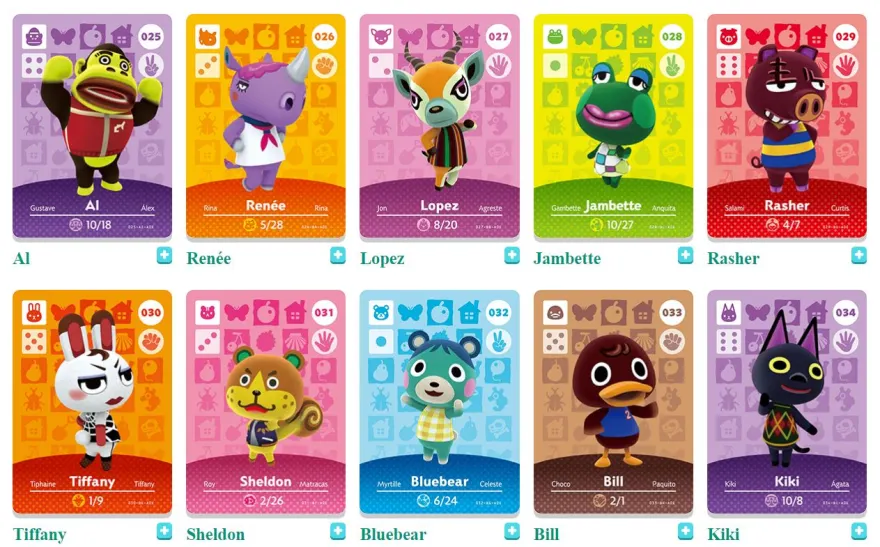
An Amiibo card is simply an NFC Type 2 tag (NTAG215) containing a properly structured data dump (.bin file). When scanned, the console reads:
- UID (unique identifier)
- Character data
- Game-specific writable blocks
Nintendo systems validate both structure and cryptographic signatures embedded in the data. You are not “creating” new Amiibo—you are replicating existing, valid data onto a compatible NFC chip.
What You Need (Updated 2026 Requirements)
1. NFC Tags (Critical)
You must use:
- NTAG215 chips only
Not compatible:
- NTAG213 → insufficient memory
- NTAG216 → wrong structure
Recommended format:
- PVC cards (credit card style)
- Stickers (cheaper, less durable)
Typical memory requirement:
- 540 bytes usable (Amiibo standard)
2. NFC-Compatible Device
Android (Recommended in 2026)
- Must support NFC writing (most modern phones do)
- Android 12–14 works best
- Android 15+ may require sideload permissions
iPhone (Limited)
- Writing Amiibo is still restricted
- You can scan, but writing requires workarounds or external hardware
Conclusion:
Use Android if you want a stable workflow.
3. Amiibo Data Files (.bin)
These contain the actual character data.
Sources:
- Personal dumps (legally safest)
- Backup from your own Amiibo collection
Avoid:
- Random internet packs (often corrupted or incomplete)
4. NFC Writing App (2026 Working Options)
Popular tools (subject to updates):
- TagMo (still the most widely used)
- Ally (clean UI, fewer features)
- NFC Tools (advanced users)
TagMo remains the standard because it supports:
- Amiibo encryption keys
- Full write control
- UID handling
5. Amiibo Encryption Keys
Required files:
- unfixed-info.bin
- locked-secret.bin
These are essential for encoding valid Amiibo data.
Without them:
- You cannot generate a usable tag
Step-by-Step Process (Working Method)
Step 1: Install Tag Writing App
Install the latest version of your NFC writing app (TagMo recommended).
Important:
- Enable “Install unknown apps” if sideloading
- Grant NFC permissions
Step 2: Load Encryption Keys
Inside the app:
- Import both key files
- Confirm they are recognized
If done correctly, the app will unlock Amiibo writing features.
Step 3: Load Amiibo .bin File
- Select your Amiibo file
- The app will parse character data
- Verify name and game compatibility
If it shows “Unknown” → file may be invalid
Step 4: Write to NTAG215 Card
Process:
- Tap “Write Tag”
- Place NFC card against phone
- Hold steady for 1–2 seconds
Successful write:
- App confirms completion
- Tag becomes locked (cannot be reused)
Step 5: Test on Console
Scan on:
- Nintendo Switch
- Wii U / 3DS (if applicable)
If valid:
- Character loads instantly
- No error message
Common Problems (And Real Fixes)
Issue 1: “Tag Not Compatible”
Cause:
- Wrong chip (213/216)
Fix:
- Use NTAG215 only
Issue 2: Write Fails Midway
Cause:
- Poor NFC alignment
- Cheap tags
Fix:
- Use higher-quality PVC cards
- Keep phone steady
Issue 3: Amiibo Not Recognized
Cause:
- Corrupted .bin file
- Missing keys
Fix:
- Replace file
- Reload keys
Issue 4: Android Can’t Write (2026 Issue)
Cause:
- OS restrictions (Android 14+)
Fix:
- Enable:
- NFC permissions
- Background activity
- Use older TagMo build if needed
Advanced Tips (What Most Guides Don’t Tell You)
1. UID Is Fixed After Writing
Unlike some NFC use cases, Amiibo cards:
- Lock UID permanently
- Cannot be rewritten or cloned again
Plan your inventory carefully.
2. Card Quality Matters
Cheap stickers:
- Lower read range
- Easier to damage
PVC cards:
- Better durability
- Stronger signal
- Preferred for resale or long-term use
3. Bulk Production Strategy
If you’re making multiple cards:
Workflow:
- Pre-load all .bin files
- Write in batches
- Label immediately
Efficiency tip:
- Use card holders to avoid mixing characters
4. Design & Printing
You can customize your cards:
- Character artwork
- QR-style layouts
- Minimalist labels
Printing options:
- Inkjet printable PVC cards
- Sticker overlays
Legal & Ethical Considerations
This is where many tutorials stay vague—don’t.
- Making backups of Amiibo you own → generally acceptable
- Distributing copyrighted Amiibo data → legally risky
- Selling cloned Amiibo → depends on jurisdiction, often restricted
If you’re running a business:
- Focus on blank NFC products
- Avoid selling pre-written Amiibo content
Final Assessment: Is It Still Worth It in 2026?
Yes—but with conditions.
Best use cases:
- Personal backup collection
- Custom-designed Amiibo cards
- NFC experimentation
Not ideal for:
- Large-scale resale of preloaded cards
- Users without Android devices
Bottom Line
Making Amiibo cards is fundamentally an NFC encoding task using NTAG215 chips and valid Amiibo data. The process is straightforward once your setup is correct—but precision matters:
- Right chip
- Correct keys
- Valid data
- Stable write process
Get those four right, and the success rate is near 100%.

About XIUCHENG RFID
XIUCHENG RFID specializes in manufacturing a wide range of RFID products, including RFID Silicone Wristbands, Tyvek Wristbands, Fabric Wristbands, Elastic Wristbands, Vinyl Wristbands, RFID Laundry Tags, Animal Tags, and RFID Cards. All products are produced under strict quality control and advanced production technology.
With 12 years of experience in wristband design, tag design, quality management, and customer relationship management, we have built a solid foundation for delivering reliable and high-performance RFID solutions.